
A DOMINATOR garage door opener can beep or flash during normal operation or to report an obstruction, power interruption, battery condition, service requirement or another model-specific status. The meaning depends on the opener model, the indicator involved and its flash pattern.
The key distinction is that DOMINATOR has used different signalling systems across its opener generations.
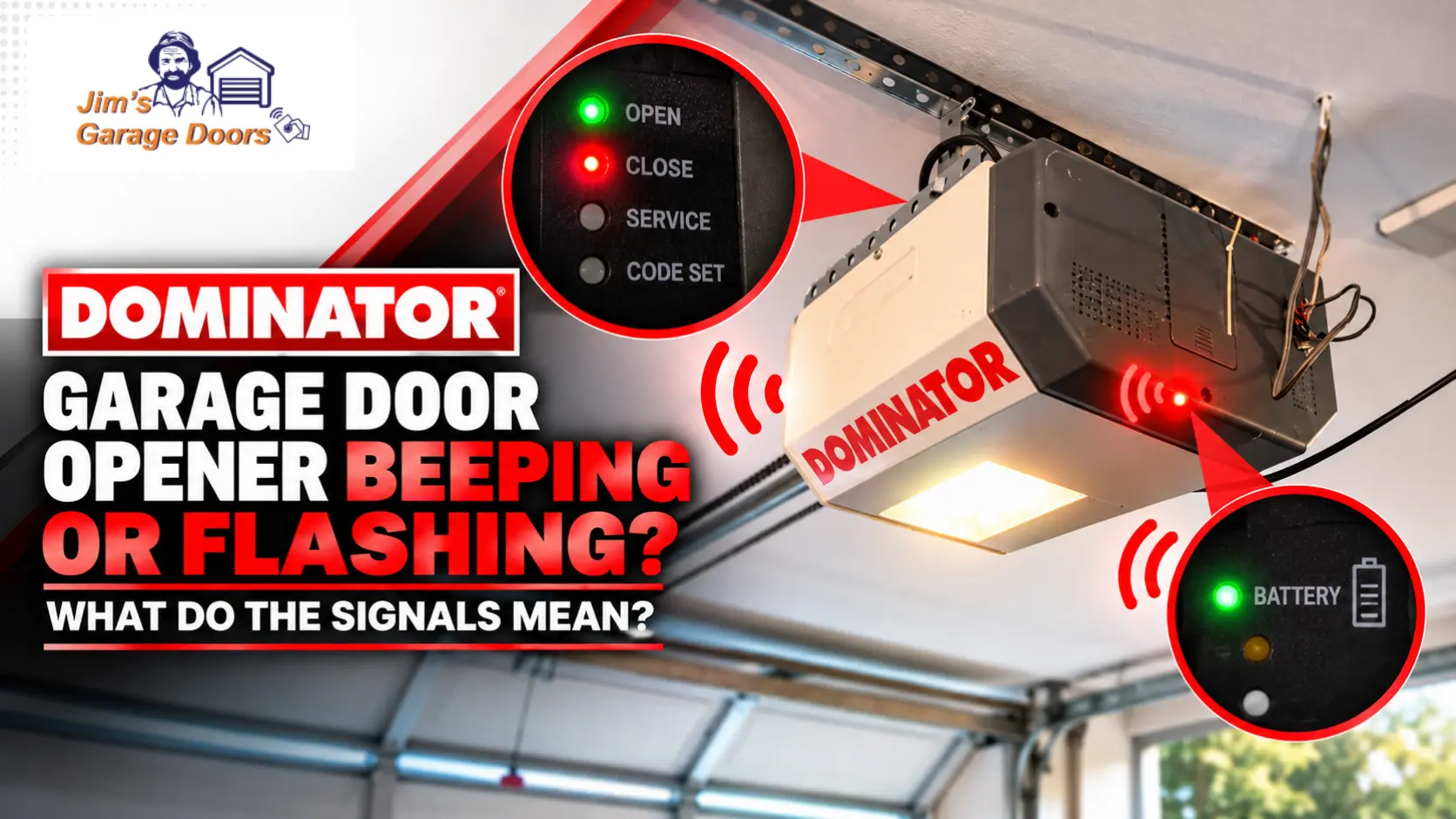
For example, applicable SMART/SMART PRO systems use dedicated status LEDs, while DOMINATOR Excel uses OPEN, CLOSE, SERVICE and CODE SET indicators with audible warnings.
Before resetting the opener, identify the model, note which indicator is flashing and count any repeated main-light flashes.
What Should You Check First When a DOMINATOR Opener Starts Beeping or Flashing?
First, identify the DOMINATOR opener model, then note which light is flashing and what the garage door is doing at the same time. A flashing movement indicator means something different than a battery, service, or diagnostic signal.
| Signal | What it can indicate | First check |
|---|---|---|
| OPEN/CLOSE light flashing | Door movement or model-specific condition | Observe door movement |
| Battery light flashing | Charging, backup operation or battery fault | Check flash pattern |
| SERVICE light | Service/repair condition | Check opener model |
| Beeping during movement | Obstruction on applicable models | Check opening and door movement |
| Repeated main-light flashes | Diagnostic condition on applicable models | Count flashes before resetting |
| Network light flashing | Connectivity status on applicable smart openers | Check network state |
A useful diagnostic rule is: identify the light before interpreting the flash. “My DOMINATOR is flashing” is not specific enough because several indicators can communicate different conditions.
Does a Flashing DOMINATOR Light Always Mean a Fault?
No. DOMINATOR openers can flash indicators during normal door movement, battery charging, remote activity, programming or network communication.
If the garage door is operating normally and an OPEN or CLOSE indicator flashes only while it moves, the signal may simply be reporting door status.
A warning becomes more significant when it appears with another symptom, for example, the door stops, reverses, refuses to move, struggles under load or displays a persistent service indication.
What Do the Lights Mean on DOMINATOR SMART and SMART PRO Openers?
Applicable DOMINATOR SMART and SMART PRO systems use separate indicators for door position, battery status, remote-control status and network status. Interpret these individually rather than as one generic fault-light system.
What Do the OPEN and CLOSED Indicators Mean?
The OPEN and CLOSED LEDs indicate door position and movement on applicable systems. A solid indicator represents the corresponding end position, while flashing occurs as the door travels.
Both indicators flashing can represent a stopped condition on relevant systems.
The important distinction is that a flashing OPEN or CLOSED indicator during normal travel is not automatically a fault code.
What Does the Battery Indicator Mean?
The battery LED can distinguish between normal charging, battery-backup operation and a battery problem on applicable DOMINATOR systems.
Depending on its state or pattern, the indicator can represent a charged battery, charging battery, battery use during a mains interruption, or a battery fault.
Therefore:
Battery light flashing ≠ a failed battery automatically.
Identify the documented pattern for the installed opener before replacing the backup battery.
What Does the Remote-Control Indicator Mean?
The remote-control indicator can report transmitter activity or an operating condition affecting remote use.
Vacation Mode is particularly relevant on compatible DOMINATOR systems because it can restrict normal transmitter operation even though the opener itself still has power.
If one transmitter fails while another works, investigate the remote separately. Our DOMINATOR remote programming and replacement guide covers batteries, compatibility and coding issues.
What Does the Network Indicator Mean?
On applicable smart DOMINATOR openers, the network LED reports connectivity status rather than a mechanical garage-door fault.
Network activity, hotspot operation, connectivity and software activity can produce different indicator states.
If the door operates normally from a local control but a connected function does not, investigate connectivity separately from the mechanical garage door.
What Do the Lights and Beeps Mean on a DOMINATOR Excel Opener?
DOMINATOR Excel uses a different diagnostic language from SMART-style systems. It has OPEN, CLOSE, SERVICE, and CODE SET indicators, and specific light or audible warning combinations communicate operating conditions.
| DOMINATOR Excel indication | Meaning |
|---|---|
| OPEN LED on | Door open |
| CLOSE LED on | Door closed |
| OPEN LED flashing | Door opening |
| CLOSE LED flashing | Door closing |
| OPEN + CLOSE flashing | Door travel stopped |
| OPEN + CLOSE alternating | Opener overloaded |
| OPEN rapidly flashing | Mains power interrupted |
| SERVICE indicator | Service or repair attention required |
This difference is why a universal “DOMINATOR flashing-light code” shouldn’t apply to every opener.
Why Does a DOMINATOR Excel Opener Beep While Moving?
On applicable DOMINATOR Excel systems, beeping during door movement can indicate an obstruction.
Check the doorway first. If nothing is blocking it but the door repeatedly struggles or stops at the same position, check the garage door for mechanical resistance instead of repeatedly operating the opener.
What Does the Excel SERVICE Light Mean?
The SERVICE indicator means the opener needs service or repair, but it does not automatically mean the motor needs replacement.
First, have a technician diagnose the opener to determine what needs attention.
Why Is My DOMINATOR Main Light Flashing Several Times?
Some DOMINATOR openers use repeated flashes of the main courtesy light as a diagnostic signal. Count the flashes before resetting or disconnecting the opener because the sequence can help identify the reported condition.
Depending on the applicable opener, diagnostic flashes can relate to conditions involving:
- safety beams;
- wireless Auto-Lock;
- wireless accessory batteries;
- maintenance;
- standby battery faults;
- door obstruction;
- motor overload or stall; or
- battery-backup operation.
The critical qualifier is model-specific.
Do not assume that, for example, three flashes have the same meaning on every DOMINATOR opener. Record the count and match it to the documentation for the installed model.
Why Is My DOMINATOR Opener Beeping?
DOMINATOR beeping can indicate an obstruction, a service reminder, or another model-specific operating condition. When the beeping occurs provides an important diagnostic clue.
Beeping while the door moves: check for obstruction or abnormal resistance, particularly on applicable Excel systems.
Beeping with a service indication: investigate the service condition rather than assuming the motor has failed.
Beeping with abnormal door movement: record the corresponding lights and inspect the door before resetting the opener.
There is no reliable rule that “DOMINATOR beeping always means service is due.”
Why Is My DOMINATOR Battery Light Flashing?
A flashing battery light can indicate charging, battery-backup operation or a battery fault on applicable DOMINATOR systems. The flash pattern and power conditions determine which interpretation applies.
If mains power has recently failed, the opener may simply be reporting battery-backup operation.
If mains power is available and the documented indicator shows charging, flashing may also be normal.
A documented battery-fault pattern requires attention, but you should not replace the battery solely because its indicator flashes.
Why Is My DOMINATOR Opener Flashing After a Power Outage?
DOMINATOR models report mains-power interruption differently. Applicable Excel documentation uses a rapidly flashing OPEN indicator, while newer systems with battery backup can display battery-related status or diagnostic indications.
That distinction is another reason to identify the opener before interpreting the warning.
If mains power has returned but the opener remains unresponsive, move from signal interpretation to the broader DOMINATOR garage door opener troubleshooting guide rather than repeatedly resetting the unit.
Should You Reset a DOMINATOR Opener to Clear a Flashing Light?
Do not reset an unexplained DOMINATOR warning before recording it. Power-cycling the opener can remove useful diagnostic information without correcting the condition that produced the warning.
This is particularly important for obstruction, overload, battery and service indications.
A reset also cannot repair a heavy, binding or damaged garage door.
When Does a DOMINATOR Warning Need Professional Attention?
Arrange an inspection when a DOMINATOR warning persists or occurs with abnormal door movement, repeated obstruction, an overload/stall condition, battery failure or a mechanical garage-door problem.
Stop operating the door if it is crooked, unusually heavy, off its tracks, has a broken or damaged spring or cable, repeatedly binds, or produces severe mechanical noises.
An opener warning can sometimes result from a mechanical door problem rather than an electronic opener failure. For example, abnormal resistance can increase the load on the opener and trigger obstruction or overload behaviour.
If diagnosis confirms a significant opener fault, our DOMINATOR opener repair or replacement guide explains when repairing the existing unit remains practical.
FAQs
Why Is the Light on My DOMINATOR Garage Door Opener Flashing?
A flashing DOMINATOR light can indicate normal movement, battery status, connectivity or a diagnostic condition. Identify the opener model and which indicator is flashing before interpreting it.
Why Does My DOMINATOR Opener Beep While the Door Moves?
On applicable DOMINATOR Excel systems, beeping during movement can indicate an obstruction. Check the opening and whether the garage door is encountering abnormal resistance.
Does a DOMINATOR SERVICE Light Mean the Motor Is Broken?
No. A SERVICE indication means attention is required, but it does not prove that the opener motor has failed or requires replacement.
Why Are Both OPEN and CLOSE Lights Flashing?
On applicable DOMINATOR systems, both indicators flashing can represent stopped door travel. Other patterns, including alternating flashes on Excel, can communicate different conditions.
Should I Count the Flashes on My DOMINATOR Opener?
Yes, if the main light is producing a repeating diagnostic sequence. Record the number before resetting the opener and interpret it using information for the exact model.
Need Help With a DOMINATOR Opener That Keeps Beeping or Flashing?
If the DOMINATOR warning persists after the relevant safe checks, assess the opener and mechanical garage door together.
Jim’s Garage Doors can inspect garage door opener faults and determine whether the warning relates to the opener, controls, safety equipment, battery system or the garage door itself.
If the door is crooked, unusually heavy, off its tracks, has a damaged spring or cable, or makes severe mechanical noises, stop operating it until it has been inspected.
Call 131 546 or request a quote for garage door repair assistance.