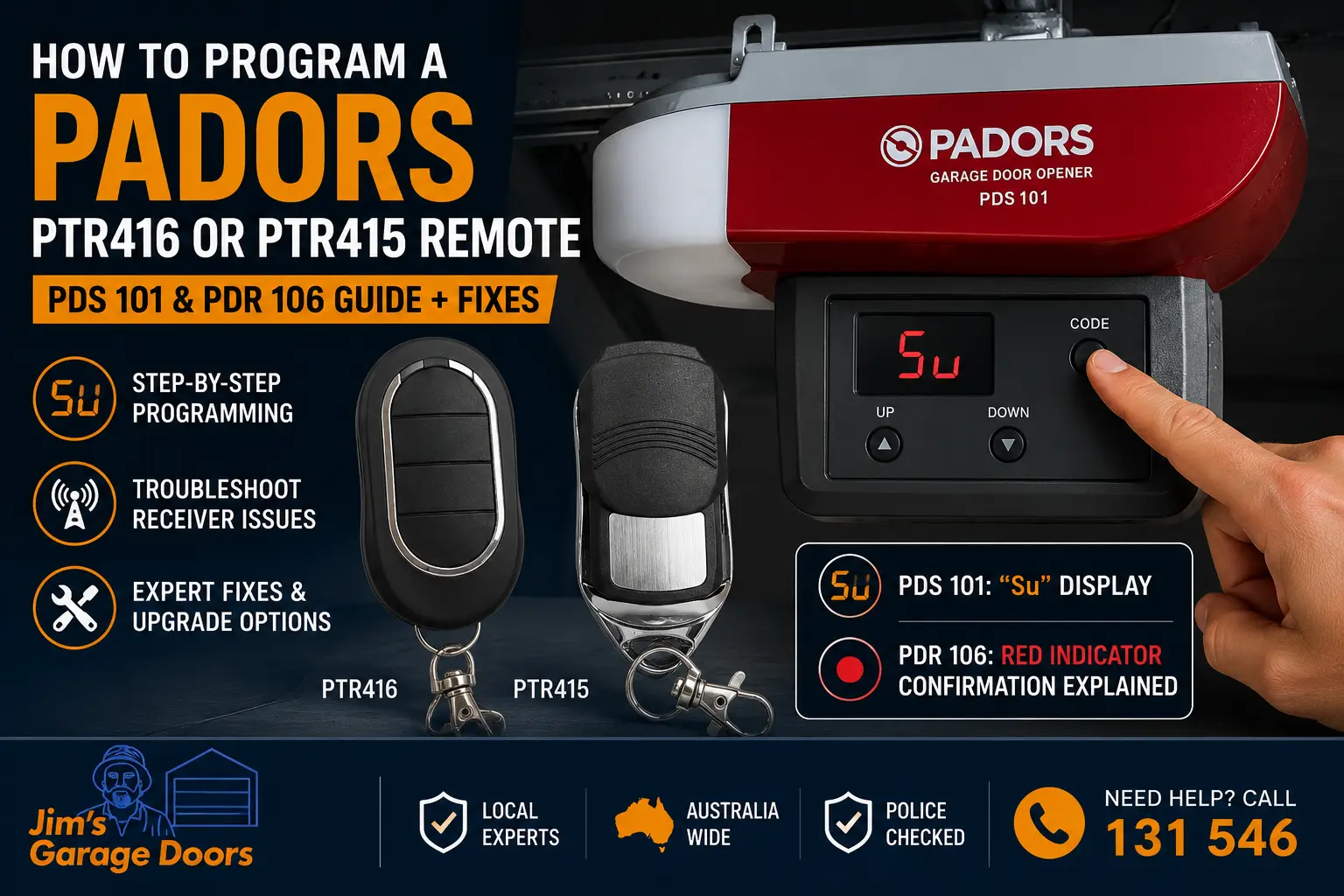
To program a Padors PTR416 or PTR415 remote, identify the opener model, press and immediately release the motor’s Code button, then press the selected remote button twice. On a PDS 101, wait for “Su” to flash and return to “–”. On a PDR 106, the red coding indicator should respond after the second press and then exit coding mode.
The opener’s receiver panel controls the coding procedure. The handset model alone does not determine which buttons, display messages or confirmation signals apply.
Only attempt programming from a stable position. Keep people, vehicles and objects clear of the garage doorway, and stop if the door moves unevenly or struggles.
Quick Summary
- Confirm the Padors opener model.
- Check that the PTR416 or PTR415 is compatible with the receiver.
- Fit a fresh remote battery.
- Press and release the Code button quickly.
- Press the same remote button twice.
- Wait for the opener’s acceptance signal.
- Test the remote with the doorway clear.
Do not hold the Code button while adding a remote. An extended press may erase stored handset codes on some Padors systems.
What Is the Difference Between a PTR416 and PTR415 Remote?
PTR416 and PTR415 are Padors remote-control model numbers used with compatible garage door opener receivers. Compatibility depends on the exact handset, receiver and motor model installed at the property.
A PTR415 should not automatically be treated as interchangeable with a PTR416.
Before purchasing or programming either remote, confirm:
- The model number printed on the original handset
- The model shown on the garage door motor
- The listed remote frequency
- The receiver or coding type
- The supplier’s compatibility information
PTR415 compatibility can vary by receiver and opener model. Confirm the original handset number and opener model before buying a replacement.
PTR416 handsets are commonly sold as Padors replacement remotes, but a similar-looking handset or matching frequency does not automatically confirm compatibility.
Will a PTR416 or PTR415 Work With Your Padors Opener?
A PTR416 or PTR415 will only work when its coding system is accepted by the receiver inside the opener.
Confirm the Motor Model
Look for a model label on the motor housing. Common Padors models include:
- PDS 101
- PDS 102
- PDR 105
- PDR 106
The label may be located on the side, underside or rear of the motor unit.
Compare the Old and New Remotes
Check the model number, button arrangement and frequency information printed on both handsets.
A replacement remote that looks almost identical may still use a different internal coding system.
Test an Existing Remote
If an older remote still operates the garage door, the motor and receiver are responding to at least one stored handset.
When an existing remote works but a new one does not, check the replacement handset, battery and compatibility before suspecting the opener.
How Do You Program a Padors Remote to a PDS 101?
To program a remote to a Padors PDS 101, press and immediately release the Code button. When the display shows “Su”, press the chosen remote button twice. The display should flash before returning to “–”.
PDS 101 Programming Steps
- Access the motor controls: Locate the programming controls and digital display on the PDS 101 motor housing. Use a stable ladder and remain clear of the garage door.
- Press and release the Code button: Press the Code or C button once and let go immediately.
- Wait for “Su”: The display should show “Su”, indicating that the opener is ready to receive a handset code.
- Press the selected remote button: Press the button you want to use on the compatible remote, then release it.
- Press the same button again: Press the exact same handset button a second time.
- Confirm the code: “Su” should flash and the display should return to “–”.
- Test the handset: Move away from the motor and test the remote with the doorway clear.
If the remote programmes successfully but the garage door still reverses unexpectedly, the problem is likely related to the safety system rather than the transmitter.
What If “Su” Does Not Flash?
If “Su” appears but does not flash after the remote button is pressed twice, the opener may not have accepted the signal.
Check:
- The remote battery
- The handset model
- Receiver compatibility
- Whether the same button was pressed twice
- Whether the sequence was completed promptly
- Whether the remote memory may be full
Retry once after confirming these details. Repeated attempts will not correct an incompatible remote or a failed receiver.
How Do You Program a Padors Remote to a PDR 106?
To program a remote to a PDR 106, press and immediately release the Code button, wait for the red coding indicator to illuminate, then press the selected remote button twice.
PDR 106 Programming Steps
- Locate the Code button and red coding indicator on the motor.
- Press the Code button once and release it immediately.
- Confirm that the red indicator illuminates.
- Press the selected remote button once.
- Release the remote button.
- Press the exact same button again.
- After the second press, the red indicator should respond and then exit coding mode.
- Test the remote with the garage doorway clear.
The final confirmation is successful door operation. If the indicator does not respond after the second press or the remote still does not operate the door, the code was not accepted.
Is the Problem the Remote or the Receiver?
The quickest diagnostic split is simple: if an existing remote still works, test the replacement handset first. If no remotes work but the wall button does, inspect the receiver side of the system.
| Test result | More likely issue | Best next step |
|---|---|---|
| Existing remote works, new remote fails | Replacement remote, battery or compatibility | Confirm the handset model and fit a fresh battery |
| No remotes work, wall control works | Receiver, antenna, erased codes or radio controls | Check whether memory was cleared, then arrange receiver testing |
| Wall control and remotes both fail | Power supply, motor controls or control board | Check the outlet and circuit breaker, then book an inspection |
| Remote works only close to the motor | Weak battery, antenna fault or poor receiver range | Replace the battery and have the receiver checked |
| “Su” appears but does not flash | Incompatible remote, incorrect sequence or receiver issue | Confirm compatibility and retry once |
| PDR 106 red indicator does not respond | Remote signal not accepted or receiver problem | Check the handset and arrange testing if it continues |
| Door starts but struggles to move | Door balance, spring, cable, track or motor-load problem | Stop using the opener and book a mechanical inspection |
| Remotes work briefly and then stop | Battery, stored-code or receiver instability | Have the opener assessed before buying more remotes |
What Do Most People Get Wrong When Programming a Padors Remote?
Most failed programming attempts result from incorrect button use, incompatible replacement handsets or using instructions for the wrong opener model.
1. Holding the Code Button Too Long
The Code button should normally be pressed and released quickly when adding a remote.
Holding it may erase stored handset codes on some Padors openers.
2. Assuming Every 433 MHz Remote Will Work
The frequency and coding protocol must both match the receiver.
A generic 433 MHz or 433.92 MHz remote may not be accepted by the opener.
3. Pressing Two Different Remote Buttons
The same handset button must be pressed twice.
Using one button for the first press and another for the second will usually prevent the code from being stored.
4. Completing the Sequence Too Slowly
The opener remains in coding mode for a limited period.
Press the remote button twice promptly after “Su” appears or the red indicator illuminates.
5. Using Instructions for the Wrong Motor
The PDS 101 and PDR 106 use different confirmation systems.
The PDS 101 uses the “Su” display, while the PDR 106 uses a red coding indicator.
6. Buying Another Remote Before Testing the Receiver
If no remotes work but the wall control still operates the door, the receiver or stored transmitter codes may be the real issue.
Buying additional handsets will not repair a receiver fault.
7. Ignoring a Heavy or Binding Garage Door
A remote may activate the motor even when the door cannot move correctly.
If the opener starts, hums, stalls or struggles, the issue may involve the springs, cables, tracks, rollers or door balance.
A remote cannot operate an opener with a failed drive mechanism, so check whether the motor only hums without lifting the door before repeating the programming process.
Why Won’t the Padors Opener Accept the Remote?
A failed programming attempt does not automatically confirm receiver failure.
Possible causes include:
- An incompatible replacement handset
- A depleted or incorrectly fitted battery
- Incorrect programming timing
- Pressing different handset buttons
- Full transmitter memory
- Erased transmitter memory
- A damaged Code button
- A receiver or antenna fault
- A wider opener control problem
Padors Programming Response Guide
| Opener response | Possible explanation | Recommended action |
|---|---|---|
| “Su” appears and flashes | The PDS 101 has probably accepted the remote | Wait for “–” and test the handset |
| “Su” appears but does not flash | The remote may be incompatible, weak or incorrectly programmed | Fit a fresh battery, confirm compatibility and retry once |
| The display remains blank | No power, display fault or control fault | Check the outlet and circuit breaker, then arrange inspection |
| An existing remote works but the new one does not | The replacement may be incompatible or faulty | Compare its details with the working handset |
| No remotes work but the wall control works | Receiver, antenna, stored-code or radio-control issue | Arrange professional testing |
| The remote only works near the motor | Weak battery, antenna problem or poor receiver range | Replace the battery and test the receiver |
| Remotes repeatedly lose operation | Stored-code, handset or receiver instability | Have the opener assessed before buying more handsets |
What Does “Su” Mean on a Padors PDS 101?
“Su” means the PDS 101 is ready to receive a compatible remote-control code.
After “Su” appears:
- Press the chosen remote button.
- Release it.
- Press the same button again.
- Wait for “Su” to flash.
- Confirm that the display returns to “–”.
If “Su” remains on the screen, check the battery, handset model and receiver compatibility.
Why Does the Padors Remote Work Only Near the Motor?
Very short remote range may indicate:
- A weak remote battery
- A damaged handset
- An incompatible replacement
- A damaged receiver antenna
- Electrical interference near the opener
- A deteriorating receiver
Replace the battery first. If the handset still only works directly beneath the motor, the antenna or receiver may require inspection.
Did You Accidentally Erase the Existing Remotes?
Holding the Code button for an extended period may clear stored handset codes on some Padors openers.
Signs that the remote memory may have been erased include:
- Every handset stopped working at the same time
- The wall control still operates the door
- The opener still enters coding mode
- Previously working handsets can be added again
When stored codes have been cleared, each compatible remote normally needs to be programmed again.
Which Padors Remote Checks Are Safe to Do Yourself?
Homeowners can identify the motor, compare handset models, replace batteries and repeat the correct programming sequence.
Receiver wiring, internal electrical testing and control-board work should be completed by an experienced garage door technician.
| Situation | Safe homeowner check | When to book a technician |
|---|---|---|
| A new remote will not program | Confirm the motor model, handset model and battery | When a confirmed compatible handset is still rejected |
| The display is blank | Check the power outlet and circuit breaker | When power is available but the opener remains unresponsive |
| One remote still works | Compare the old and new handset details | When the correct replacement still cannot be stored |
| No remotes work | Test the wall control while clear of the door | When the wall control works but every remote fails |
| Receiver replacement is being considered | Do not alter internal wiring | Receiver installation should be completed professionally |
| The door moves unevenly or feels heavy | Stop automatic operation | Book a door and opener inspection |
Can an External Receiver Keep an Older Padors Opener Working?
A compatible external receiver may allow a serviceable Padors motor to operate using modern replacement remotes.
The external receiver connects to a suitable low-voltage control input and supplies a separate radio-control system. It may bypass an unreliable internal receiver without requiring immediate motor replacement.
When a Receiver Retrofit May Be Suitable
A retrofit may be considered when:
- The wall control operates the motor reliably
- The garage door is balanced
- The door moves smoothly
- The main failure is limited to remote reception
- The opener has a suitable low-voltage input
- The motor remains in reasonable condition
When a Receiver Retrofit May Not Be Suitable
A retrofit may not make sense when:
- The motor stalls or stops intermittently
- The control panel is unreliable
- The garage door is heavy or unbalanced
- The opener has several electrical faults
- Internal drive parts are worn
- Compatible terminals are unavailable
- Repair costs are too high for the age of the system
An external receiver does not repair worn drive parts, broken springs, snapped cables, bent tracks, poor door balance or major control-board faults.
Programming steps can vary slightly between PDR-series models, especially the PDR-105 and PDR-106.
Should You Retrofit the Receiver or Replace the Padors Opener?
A receiver retrofit may be reasonable when the motor and garage door remain dependable. Opener replacement is generally more practical when remote failure occurs alongside motor, control or mechanical faults.
Consider a Receiver Retrofit When
- The motor works correctly from the wall control
- The door is properly balanced
- The failure is limited to remote operation
- A compatible receiver can be connected safely
- The retrofit cost is reasonable
- You are satisfied with the current opener
Consider Replacing the Opener When
- The motor stalls, hums or stops
- The control display is unreliable
- The opener has several faults
- Original parts are scarce
- Repairs are becoming frequent
- Compatible remotes are difficult to obtain
- You want updated safety and access-control features
A technician should inspect both the opener and garage door before recommending either option. A motor that appears weak may be struggling against a heavy or poorly balanced door.
Need Help With a Padors Garage Door Opener?
When a PTR416 or PTR415 will not pair, the fault may involve the handset battery, receiver antenna, coding controls, stored transmitter memory or the opener itself.
Jim’s Garage Doors provides professional garage door opener repairs and replacements, including remote diagnosis, receiver testing, external receiver installations and replacement motors for older Padors systems.
A technician can determine whether the most practical solution is:
- Reprogramming the handset
- Replacing a faulty remote
- Restoring erased remote codes
- Testing the receiver and antenna
- Installing an external receiver
- Repairing a related garage door fault
- Replacing an unreliable opener
Frequently Asked Questions
Do I press or hold the Code button on a Padors opener?
Press the Code button once and release it immediately when adding a remote. Holding it may erase stored handset codes on some Padors models.
Is a PTR415 the same as a PTR416?
Not necessarily. Compatibility depends on the handset, receiver and opener model. Check the original remote number and motor model before purchasing a replacement.
What does “Su” mean on a Padors PDS 101?
“Su” means the opener is ready to receive a compatible remote code. Press the selected handset button twice and wait for the display to flash.
Why does “Su” stay on the Padors display?
The opener may not be receiving an accepted signal. Check the battery, handset compatibility and programming sequence.
Will any 433 MHz remote work with a Padors opener?
No. The frequency and coding protocol must both be compatible with the receiver.
Can an aftermarket PTR416 or PTR415 remote be programmed?
An aftermarket remote may work when it matches the opener’s frequency and coding protocol. Check the supplier’s compatibility information against the exact Padors motor and original handset model before purchase.
Can I install an external receiver without replacing the motor?
Sometimes. A technician may be able to connect a compatible receiver when the motor, garage door and low-voltage controls remain serviceable.
Why did all my Padors remotes stop working?
The stored remote memory may have been erased, especially if the Code button was held down. Each compatible handset may need to be programmed again.
Get Your Padors Remote Working Again
Call Jim’s Garage Doors on 131 546 if your Padors remote will not store, every handset has stopped working, the opener only responds at close range, or you need advice about an external receiver or replacement motor.
Our technicians can inspect the remote, receiver, motor controls and garage door operation before recommending the most suitable repair.